
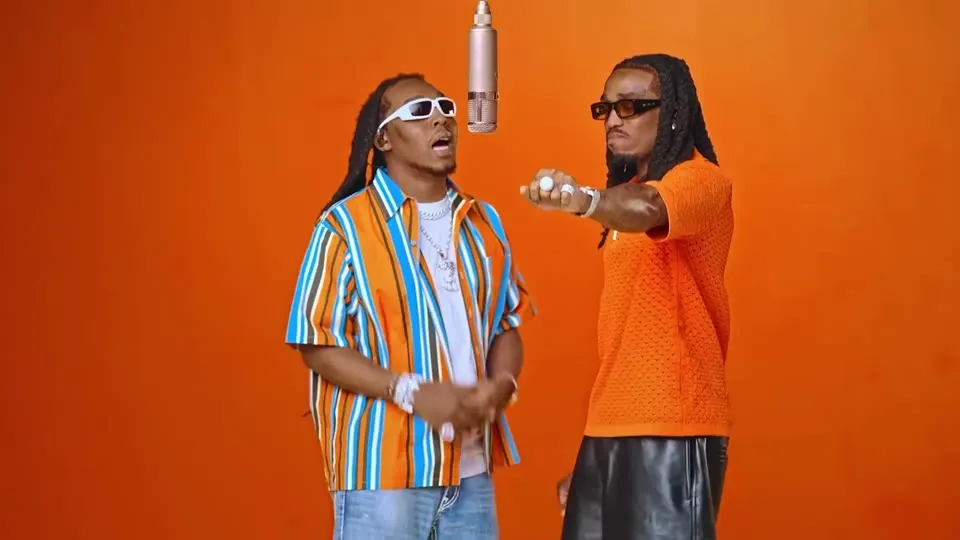
Two portraits. One orange booth.
Hotel Lobby AI Video Generator
Make a Hotel Lobby AI video with you and a friend in the two performer positions. Add a photo for each side, choose a clip length, and let the prepared reference guide the scene and movement. This Hotel Lobby AI generator gives you a 720p landscape video to preview and download, with the credit cost shown before you start.
2 photos · 5–15 seconds · 720p · 16:9 · AI-generated audio
How to make the Hotel Lobby AI video
The Hotel Lobby AI template is already connected to the generator. You do not need to locate a reference clip, describe the room, or build a timeline to start.
- 01
Choose the two faces
For your Hotel Lobby AI video, pick one separate portrait for each performer. The first image fills the left role; the second fills the right. Check the previews and swap them if you want to reverse the cast.
- 02
Choose a model, length and credits
选择 Mini、Fast 或 Pro,再选择 5 秒进行简短测试,或选择 10 秒、15 秒展示更多互动。输出固定为 720p、16:9,确保两位角色都能完整入镜。生成前请确认页面显示的积分费用。
- 03
Watch the whole clip
Preview your Hotel Lobby AI video from beginning to end. Check both faces, their assigned sides, hand movement and sound. Download the result you like; your saved tasks also appear in video history.
Hotel Lobby AI video examples
Explore how a different pair changes the mood of the same performance. These Hotel Lobby AI trend examples come from the TryH3 reference collection; they illustrate casting ideas and are not verified outputs of this generator. Their audio and framing can differ from your result.
What the Hotel Lobby AI template controls
Hotel Lobby AI uses photos for identity and a prepared clip for performance. A Hotel Lobby character swap follows the two assigned roles. The reference gives this Hotel Lobby COLORS AI video its orange setting, central microphone and two-person composition. The model attempts to carry your chosen faces through the gestures rather than starting a new scene from a written description.
A clear role for each portrait
Separate left and right inputs tell the model who belongs in each position. Two people in one uploaded image make that assignment less clear, so give each performer a dedicated photo.
A reference for the movement
The Hotel Lobby AI generator sends a reference clip matching the selected length. Its camera, rhythm and gestures guide the output. Small changes in expression, clothing or body movement can still occur.
Audio with an honest boundary
This version asks the model to generate synchronized sound. It does not add the original song back after generation. Listen before posting: voices, music and mouth timing may differ from the reference.
Photo tips for a cleaner Hotel Lobby face swap
Good source photos give Hotel Lobby AI more usable detail. Start with an evenly lit, front-facing portrait of one person. Keep eyes, hair and the outline of the face visible, and include the upper body when possible. Avoid a tiny face inside a group shot or a crop that removes the chin.
Use comparable framing
Two photos with similar scale and lighting make the cast easier to read. A sharp waist-up image paired with another waist-up image is a better starting point than mixing a distant full-body photo with a tightly cropped selfie.
Review the Hotel Lobby AI result
Pause when either performer turns or raises a hand. Those moments can reveal face drift, merged features or a changed hairstyle. A convincing opening frame does not guarantee the rest of the video stays consistent.
Test before extending
Try a 5-second Hotel Lobby AI clip to assess a pair of portraits before spending more credits on a longer version. Each generation is a new attempt; repeating the same photos may produce a different result.
What is the Hotel Lobby AI trend?
The Hotel Lobby AI trend recasts the duet associated with Quavo and Takeoff’s “Hotel Lobby” performance on A COLORS SHOW. The name refers to the song, while the recognizable visual is an orange studio and a hanging microphone. People searching for a Migos AI video usually want to put a new pair into that setup. This tool focuses on that two-person format, with a fixed reference rather than hotel interior design.
Choose a duo for your Hotel Lobby AI edit
Use your own portraits to cast two friends, a couple, siblings or two versions of the same person. For an original character pairing, prepare each character separately before uploading. The reference gallery includes stylized and animal examples, but this generator works most predictably with clear human portraits; nonhuman results are experimental.
Hotel Lobby AI credits and video lengths
Each Hotel Lobby AI run uses credits from your account. Your model and video length determine the charge; the credit deduction stays the same across plans. The table lists credits per video for each model. Longer clips cost more because both the reference and generated video are longer. Prices below match the charge calculated by the server.
| Video model | 5 seconds | 10 seconds | 15 seconds |
|---|---|---|---|
| Seedance 2.0 Mini | 8 | 15 | 23 |
| Seedance 2.0 Fast | 28 | 56 | 83 |
| Seedance 2.0 Pro | 47 | 93 | 139 |
A confirmed provider failure returns the reserved credits. A slow response or temporary connection error does not mean the task failed; check its saved status before starting another paid run.
Compare credit plansHotel Lobby AI questions
Does Hotel Lobby AI need two different people?
It needs two photo inputs, one for each role. You can use the same person in both slots, or choose two people. Upload a separate, clear portrait for each slot instead of a group photo.
Do I need to write Hotel Lobby AI prompts?
No. The generator supplies the instructions and performance reference. You control the two portraits, their left/right order, model and video length. There is no custom prompt or custom scene setting on this page.
Will my Hotel Lobby AI video include the original song?
The output includes model-generated audio guided by the reference. This version does not restore the original recording, and it cannot promise exact lyrics, voices or lip sync. Preview the sound before sharing.
Why are the faces changing or blending?
Hidden facial features, side profiles and multiple faces in one image can make identity transfer harder. Try a sharper portrait with even lighting and an unobstructed face. AI identity and hand movement may still vary.
How long does Hotel Lobby AI take?
Processing depends on the provider queue and the selected length, so there is no fixed completion time. The page checks the saved task status. You can return to video history if you leave the page or your connection drops.
Are credits refunded when Hotel Lobby AI fails?
Credits are reserved once for a submitted task. If the provider confirms a failure or cancellation, that task’s credits are refunded automatically. A pending task remains reserved while the provider confirms the outcome.
Can I change the room or make a vertical video?
This Hotel Lobby AI template uses one fixed performance and 16:9 framing to keep both people visible. Choose a general video generator for a different scene, or motion control if you want to supply your own movement reference.
Can I use pets or illustrated characters?
You can upload a supported image, but this workflow is designed around human portrait replacement. Animal and illustrated faces may change shape or lose identity. The reference examples are inspiration, not a guarantee for those subjects.
Continue creating with your characters
Make your own Hotel Lobby AI duo
Choose two clear portraits, decide who stands on each side, and start with the length that suits your idea. The reference is ready and the credit cost is visible before you generate.
Back to the generator