Give your next speedster, explorer or inventor a look of their own. This Sonic OC maker turns your description or character reference into an original illustration. Choose the species, shape the silhouette and make the outfit yours.
One 2K image · 2 credits in either mode · Sign in to create
Describe a new character, or load one of the Sonic OC maker prompts below and change the details.
Your Sonic OC artwork
Your character will appear here. Try an example prompt below to get started.
Your Sonic OC artwork
Your character will appear here. Try an example prompt below to get started.
Recent images follow the selected mode and may include results from your other character tools.
Sonic OC maker ideas to make your own
Start with a character role, then give it a recognizable shape and a small color palette. These original AI-generated concepts illustrate possible styles; they are not recorded outputs from this tool. Use a prompt to explore your own version. Results will vary.
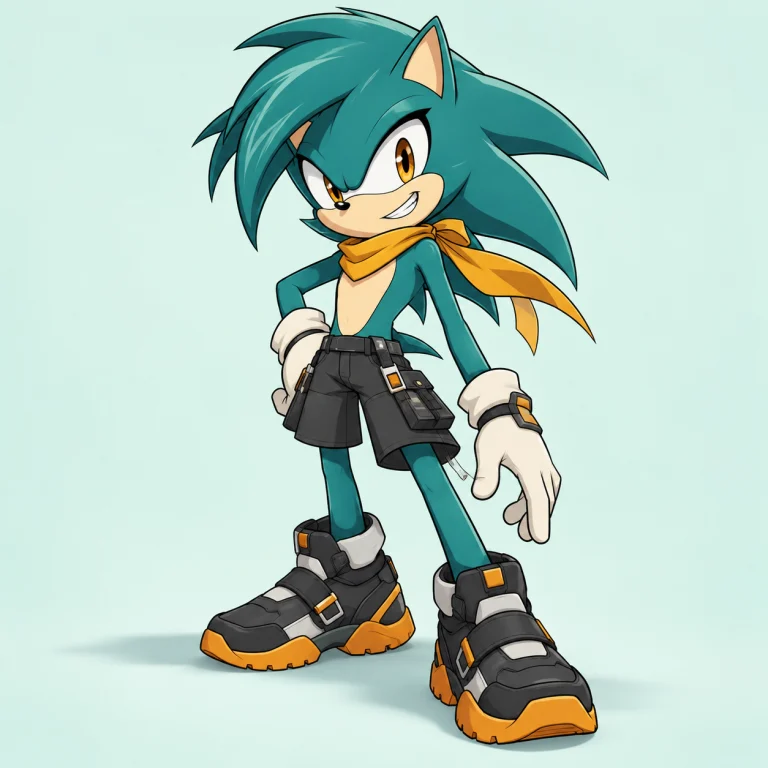
Volt · Hedgehog courier
Swept quills and a bright scarf give this hedgehog OC a quick, readable silhouette. Change the scarf, shoes or expression to build a different personality.
View starter prompt
An original teal hedgehog speed courier with swept-back asymmetrical quills, amber eyes, a mustard scarf, ivory gloves and charcoal utility shorts. Chunky graphite sneakers with orange soles. Confident grin, one hand on hip, full body with all shoes and quills visible, pale mint background, bold outlines and crisp 2D cel shading.
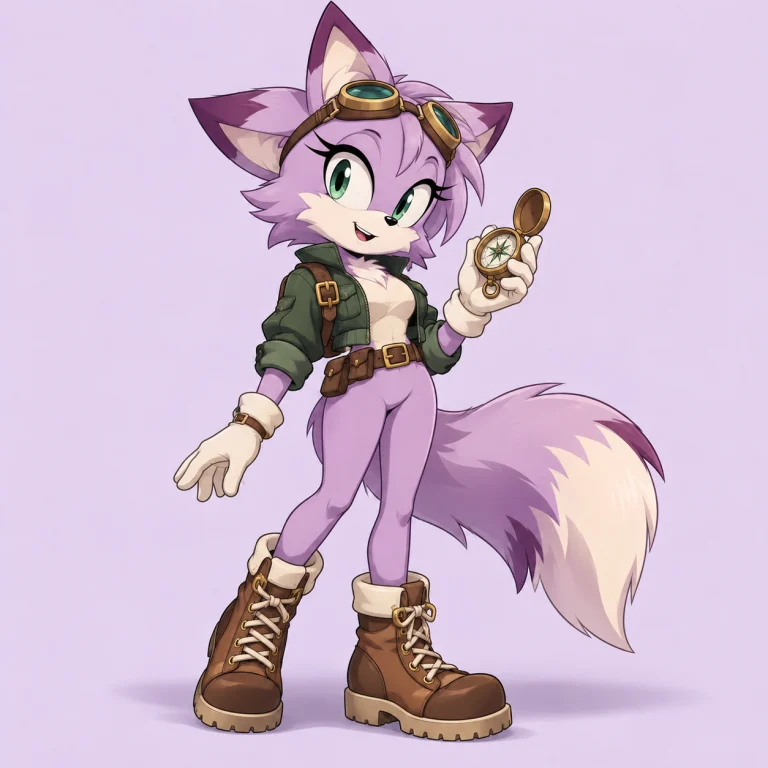
Luna · Fox explorer
A single fluffy tail, explorer boots and a compass make the role clear. The lilac and green palette also works well for a recognizable avatar.
View starter prompt
An original lilac single-tailed fox explorer with plum ear tips, mint-green eyes and an ivory muzzle. Forest-green aviator jacket, goggles above the forehead, cream gloves and brown explorer boots. Holding a small compass, curious smile, full body with ears and boots visible, pale lavender background, polished 2D cartoon art.
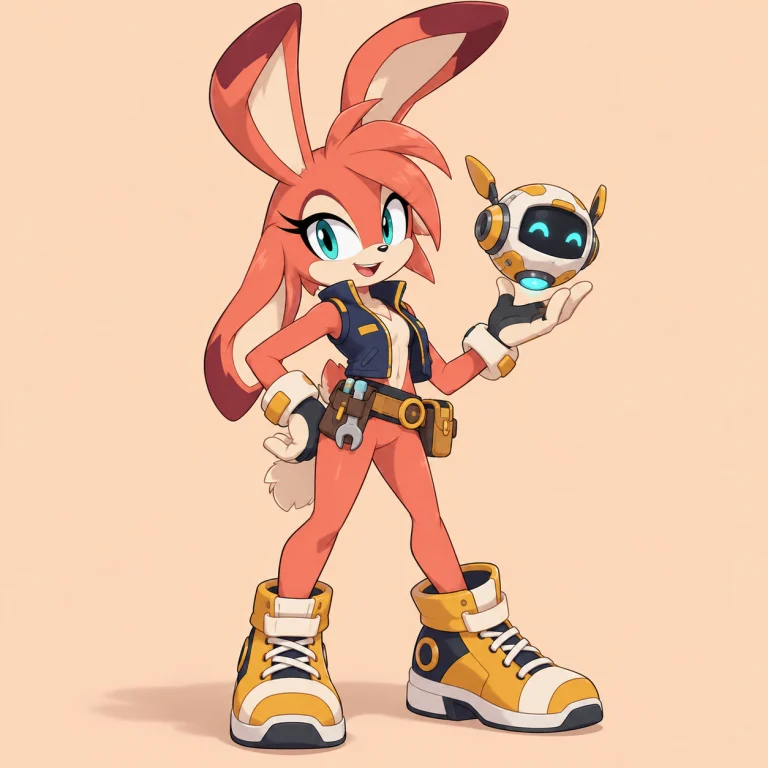
Ember · Rabbit inventor
Long ears and a small repair drone turn a simple animal design into a character concept. Use the Sonic OC maker to try a new profession or signature accessory.
View starter prompt
An original coral rabbit inventor with long ears, burgundy ear tips and turquoise eyes. Navy work vest, small utility belt, cream fingerless gloves and mustard high-top sneakers. Holding a friendly spherical repair drone, optimistic expression, full body with ears and sneakers visible, pale peach background, clean cel-shaded illustration.
A Sonic OC creator for your own character ideas
OC means original character: a fan-created personality with their own appearance and story. This Sonic the Hedgehog OC maker helps you visualize that idea as a standalone image. Describe a hedgehog, fox, rabbit or another animal, then specify the details that make it recognizable.
Use the Sonic OC generator for a roleplay profile, a fan-story reference or an outfit concept. You direct the design with words or an uploaded image. The Sonic OC maker generates artwork from that direction, so precise details may need another attempt or manual cleanup.
How to use the Sonic OC maker
Create a Sonic character in three steps. This Sonic character creator online supports both a fresh description and a design you already have.
1
Describe or upload your character
Choose From text in the Sonic OC maker for a new idea. Name the species, main fur color, eyes, outfit and one defining detail. Choose From an image to guide the result with your own sketch or reference.
2
Choose a frame and generate
Use 1:1 for a profile picture or 2:3 and 3:4 for a standing character. Sign in and generate one 2K image for 2 credits. The Sonic OC maker charges the same amount in either mode.
3
Review, download and refine
Check the hands, ears, quills and shoes before downloading. Save the result, then use it as a reference for another outfit or pose. Each new generation has its own credit charge.
Create a full-body Sonic OC with a clear silhouette
If you need a Sonic OC creator for full-body artwork, start with a portrait ratio and ask for the entire character in view. Describe how the ears or quills sit, how large the gloves are and what makes the shoes distinctive. A simple standing pose makes these details easier to inspect.
The Sonic OC maker can turn those instructions into a character concept for your art or story. Begin with a plain background; add motion effects only after you like the design. A full-body illustration is not an animation sheet or a game-ready asset.
A Sonic avatar maker for your next profile picture
Use the Sonic avatar creator with a square frame and ask for a head-and-shoulders portrait. Keep the eyes visible, the background simple and the main colors distinct. A readable face matters more than tiny accessories when the image appears inside a small profile circle.
Looking for a Sonicsona maker? Bring your favorite colors, jacket or hobby into a personal fan character. This Sonic sona maker workflow starts with your description, then gives you an image to crop for a profile or share alongside your character's name and story.
Illustrative rabbit concept · Upload your own design in From an image mode.
Use the Sonic OC maker with your existing design
Upload a clear sketch or character image in From an image mode. The first reference guides the species, face, fur palette and distinctive silhouette. Additional references can guide clothing or colors. Tell the Sonic OC maker what should stay recognizable before describing the change.
Try one change at a time: a new jacket, a calmer expression or a different pose. You can use up to five reference images, with a 5 MB per-file limit in the upload picker. This is a new AI rendering of your design; exact shapes and accessory placement can vary.
Write a stronger Sonic OC maker prompt
Think like a Sonic character designer: make the silhouette, palette and role agree. A compact, specific prompt gives this Sonic character designer online a clearer direction than a long list of competing ideas.
Choose a species and a silhouette
Begin with one animal and its defining feature: swept hedgehog quills, tall rabbit ears or a single fox tail. Add a face shape and expression. For an edgy Sonic OC, a narrow gaze and angular silhouette are more useful instructions than just saying cool.
Keep the palette easy to repeat
Pick a main fur color, a supporting outfit color and one accent. State where each belongs, such as teal fur, a charcoal jacket and amber shoe soles. Reuse those details when you make a Sonic OC in another pose.
Specify the style and framing
For 2D art, ask the Sonic OC maker for clean outlines and cel shading. A classic Sonic OC maker prompt can request simple shapes and flat retro colors. Add either full body with all shoes visible or a close avatar portrait, rather than asking for both.
What your Sonic OC maker result includes
Each request returns one raster illustration at the 2K setting. Choose from 1:1, 3:4, 2:3, 4:3 and 16:9; exact pixel dimensions depend on the ratio. Prompts can be up to 2,000 characters. Download saves the original image format returned by the provider. For a Sonic character sheet, arrange and check separate views yourself; a matching multi-view layout is not guaranteed.
This independent fan-inspired tool is not affiliated with SEGA or Sonic Team. It does not edit a game save, assemble a playable avatar or export an editable 3D model. To continue exploring the same design, use your saved image as a reference in the character tools.
A Sonic OC maker helps you design an original character inspired by the Sonic universe. Here, you describe the character or upload a reference and receive an illustration. You can make a hero, rival or everyday character with your own species, colors and outfit.
Can I customize the species, colors and clothes?
In the Sonic OC maker, write the animal species, fur color, eyes, quill or ear shape, clothing and accessories in your prompt. You can use this as a Sonic girl maker or create other character presentations by describing the look you want. The controls use text and reference images; there are no draggable clothing parts.
Can I make a full-body character or an avatar?
Yes. Set the Sonic OC maker to 2:3 or 3:4 to give the ears and shoes room. For an avatar, choose 1:1 and request a face or upper-body portrait. Inspect the result and crop it locally if your profile service needs a specific size.
Can I turn my drawing into a Sonic OC?
Select From an image in the Sonic OC maker and upload your drawing as the first reference. A clear silhouette and visible colors give the model more useful guidance. Say which details to preserve, then describe the desired finish. Extra references can guide the palette or outfit; the tool accepts up to five images, each up to 5 MB in the upload picker.
How many credits does the Sonic OC maker use?
Both modes cost 2 credits for one 2K image. Reference images do not add a separate credit charge. Sign in with enough credits before generating. A revision is a new request. Confirmed failed tasks return their reserved credits; a task that is still processing has not failed.
Is this a 3D Sonic OC maker or a Sonic Forces editor?
The output is a flat image. You may request a 3D-rendered look, but that does not create a mesh, rig or model file. This page is not the Sonic Forces character creator and cannot import a character into a game. Use the illustration as a visual reference for separate modeling or game-asset work.
How can I keep the same OC across different images?
Save a result you like, upload it to the Sonic OC maker as the first reference and repeat the same species, fur palette, eyes and signature accessory in your prompt. Change one detail at a time. References help guide the design, but identical features across generations are not guaranteed.
How do I download the artwork, and what are the examples?
Use Download in the result panel after generation finishes. Your signed-in history also lists recent images. The three character cards are original AI-generated style concepts, not official Sonic artwork or recorded outputs from the production generator. Their prompts are starting points; your generated image will differ.
Make your next character with the Sonic OC maker
Start with a species, a color palette and one detail that feels like your character. Load an example or upload your own design, then give your next OC a face.